
Device Shipments
Overview
Section titled “Overview”Physical devices ship directly to the location you chose on the request, and every device comes with a pre-paid label to send it back. This page covers the parts that trip people up, such as finding your tracking number, knowing what to check when the box arrives, and getting the device returned on time so you avoid overage charges.
Tracking Your Shipment
Section titled “Tracking Your Shipment”Once a device ships, the fastest place to find tracking is the ARROW Platform. Go to Device Requests, click your request to open it, and check the Shipping tab. As soon as the carrier scans the package, Shipping Tracking leads with where it is right now, giving you a map of the latest scan, the city and state it happened in, how long ago it was, and an Est. delivery date when the carrier has given one. Below that it shows the carrier and status, plus the outbound tracking number and, once the return leg exists, the return tracking number. Each number links straight to the carrier, and beside it are a copy button and a printer button that opens the label itself. You will also get an automated email the moment it ships, with the tracking number and a carrier link.
The Status column on the Device Requests table is your at-a-glance view of where a shipment sits. It moves through Shipping, In Transit, and On-Site as the device makes its way to you.
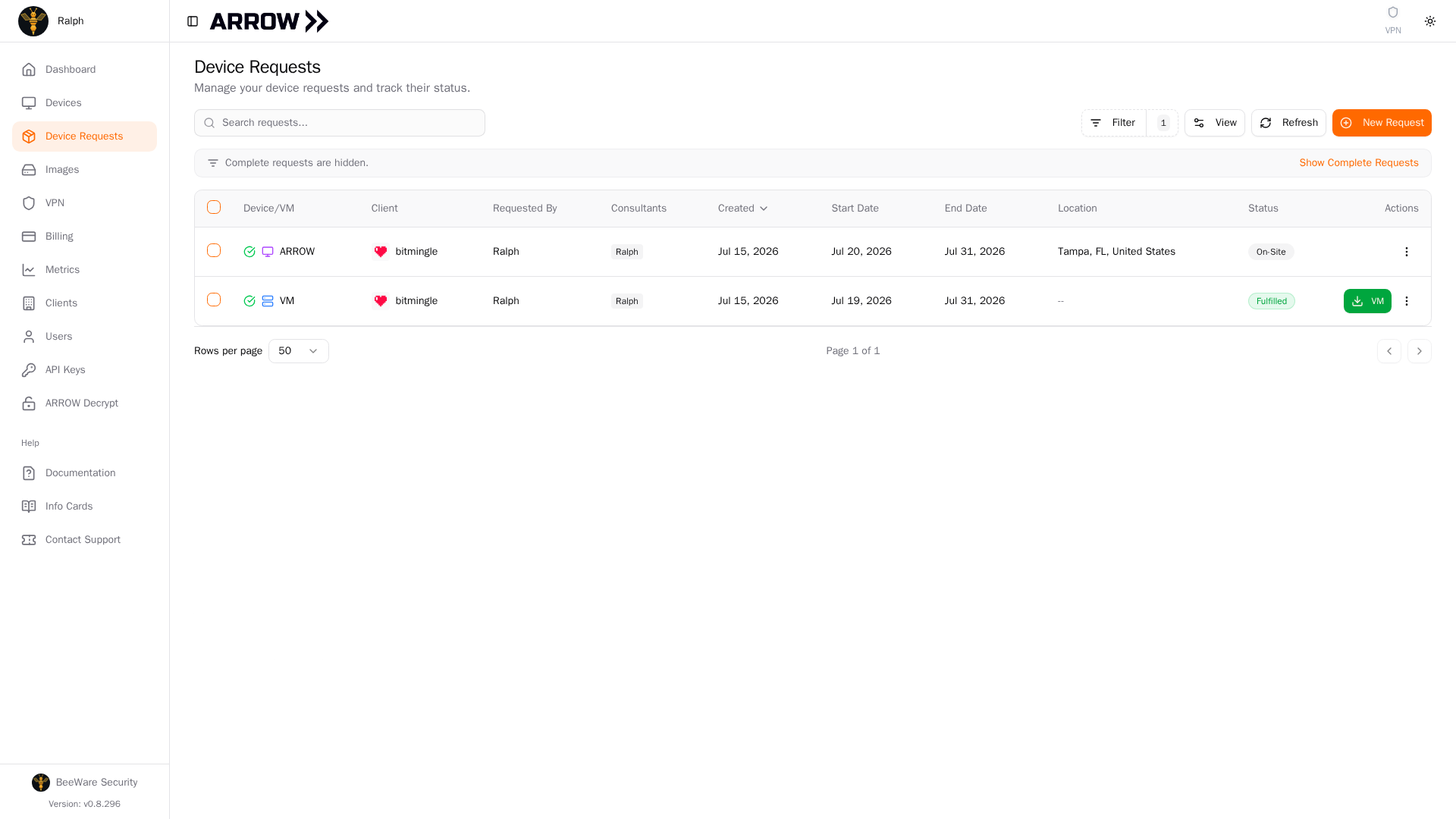
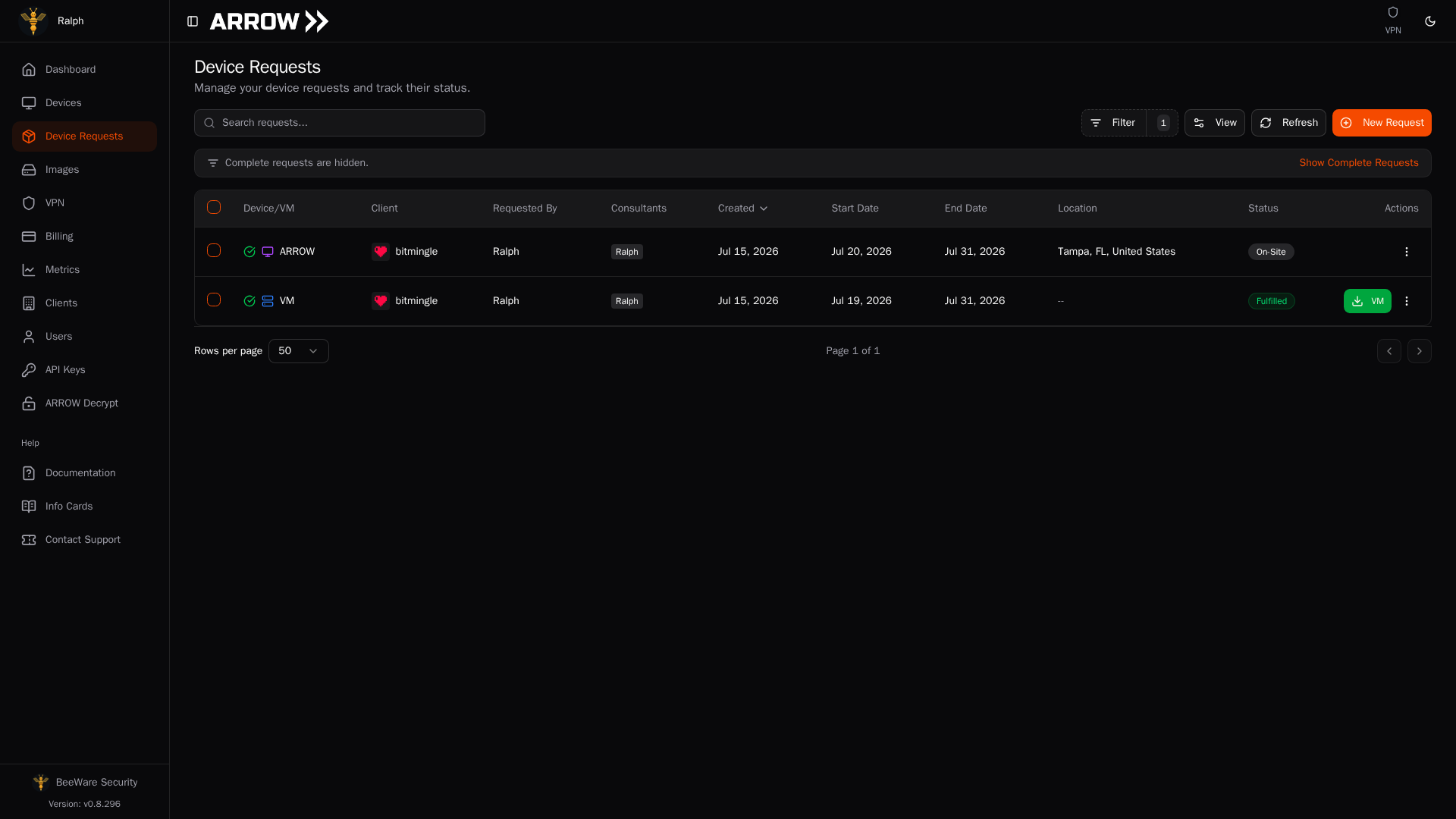
The Status column on the Device Requests table tracks each physical shipment through to On-Site
The Status column on the Device Requests table tracks each physical shipment through to On-Site
For live, detailed tracking, copy the number into the carrier’s website (FedEx, UPS, and so on). The ARROW Platform shows the latest scan rather than the full scan history, so the carrier is where you get delivery windows, signature confirmation, and any missed-delivery notices.
Receiving Your Device
Section titled “Receiving Your Device”Your package includes the ARROW device pre-configured for your engagement, the power adapter and cables, a quick start guide, and a pre-paid return shipping label.
When the box arrives, take a minute to inspect it for shipping damage, confirm the contents match the packing list, power the device on to verify it boots, and then sign into ARROW Manager to finish setup. If anything is damaged or missing, contact VTEM Labs support right away.
You do not have to mark the device as delivered yourself. The ARROW Platform updates automatically. The request status flips to “On-Site”, engagement tracking starts, and the device appears as active on your Devices page.
Once it lands, the request records how the delivery went against the date you asked for. Open the request and the Deployment Schedule card reads back, under the dates, whether the device was delivered on the start date, a number of days early, or a number of days late. That is the same date your billing is measured from, so it is worth a look. See How the start date works for what the date commits us to and When the clock starts and stops for what it means on your plan.
Delivery Issues
Section titled “Delivery Issues”It arrived later than my start date. The request shows how late, and on pay-as-you-go billing starts at the hour it actually arrived rather than on the start date, so you are not charged for the gap. If a late delivery cost you engagement time, contact VTEM Labs support.
Tracking says delivered but nothing arrived. Check with your mailroom or reception desk first, look for a delivery notice from the carrier, and call the carrier with your tracking number. If it is still unresolved after 24 hours, contact VTEM Labs support.
The device arrived damaged. Photograph the damage, hold onto all the packaging in case it is needed for a claim, and contact VTEM Labs support immediately. We will arrange a replacement if needed.
The shipping address is wrong. If no shipping label has been purchased yet, open the request in Device Requests, go to the Shipping tab, and click Update address on the Delivery Location card. Correcting the address on the client record works as well: a saved location you fix under Clients now flows through to every open request that ships to it, as long as no label has been bought for that request yet. The delivery contact on the request is left as you set it, since who receives a particular box is a choice per engagement. Once the label exists the address is fixed, so contact VTEM Labs support: before the device ships we can void the label and issue a new one, and if it is already in transit we will try a carrier redirect.
Returning Devices
Section titled “Returning Devices”Return the device at the end of your engagement. The end date on your request is the signal for when it should head back, and shipping late can mean overage charges.
Tip Need more time? Extend your request dates from the Devices page before the engagement ends, rather than letting it run over.
The easy path uses the label that came in the box. Package the device securely (the original packaging is ideal), affix the pre-paid return label, drop it at any carrier location indicated on the label, and keep your receipt with the tracking number. That return label works from any carrier drop-off point, even if you are shipping from a different address than the one the device was delivered to.
Lost the label? Print another one
Section titled “Lost the label? Print another one”You do not need the paper copy that shipped in the box. The return label lives on the request, and you can print it again yourself whenever you need it. Go to Device Requests, open the request, and select the Shipping tab. The Return Tracking row carries the return tracking number, and the printer button next to it opens the label in a new window with your browser’s print dialog already up. The same printer button sits on the Shipping card when you open a device from the Devices page, so either route gets you there.
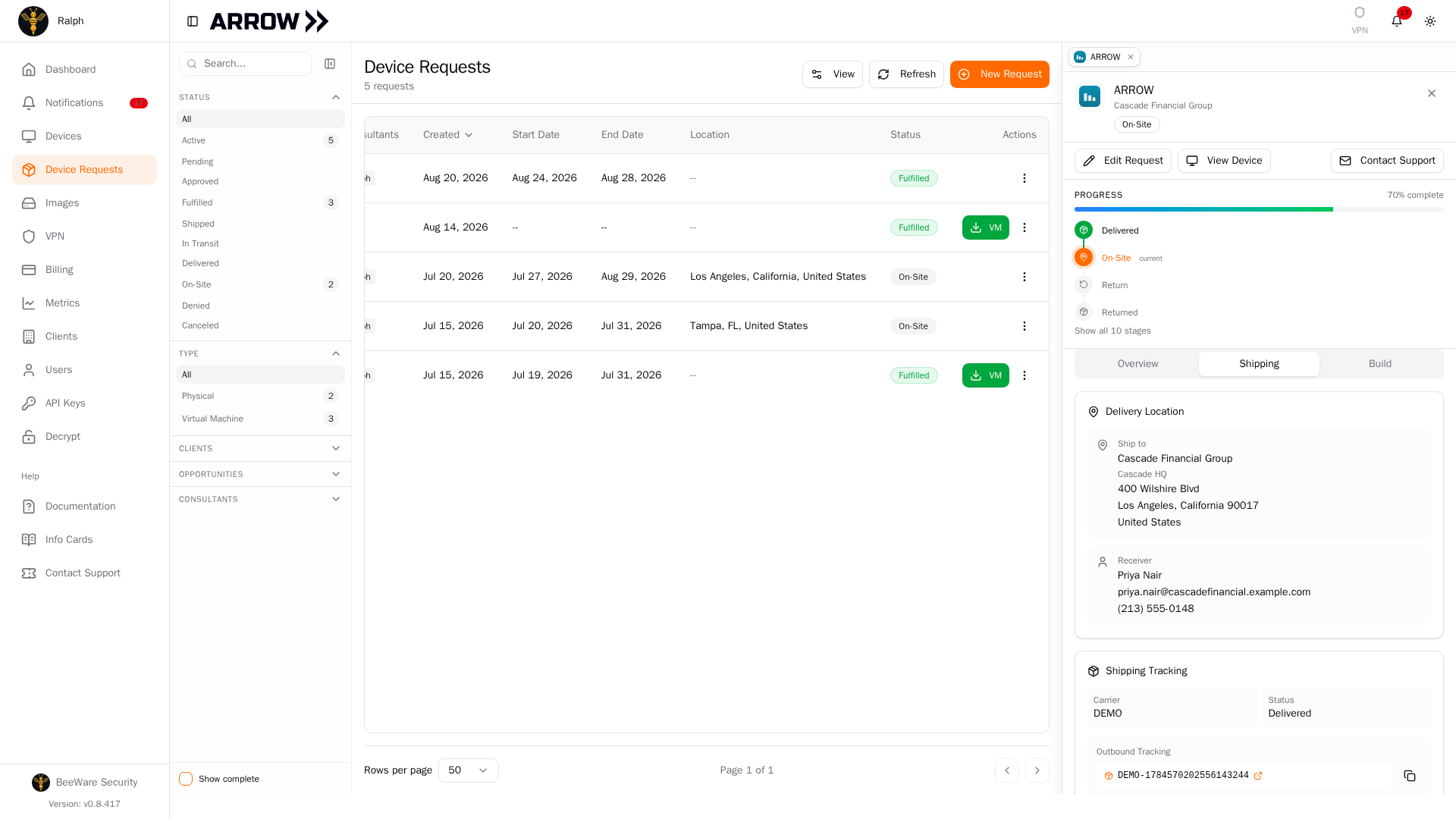
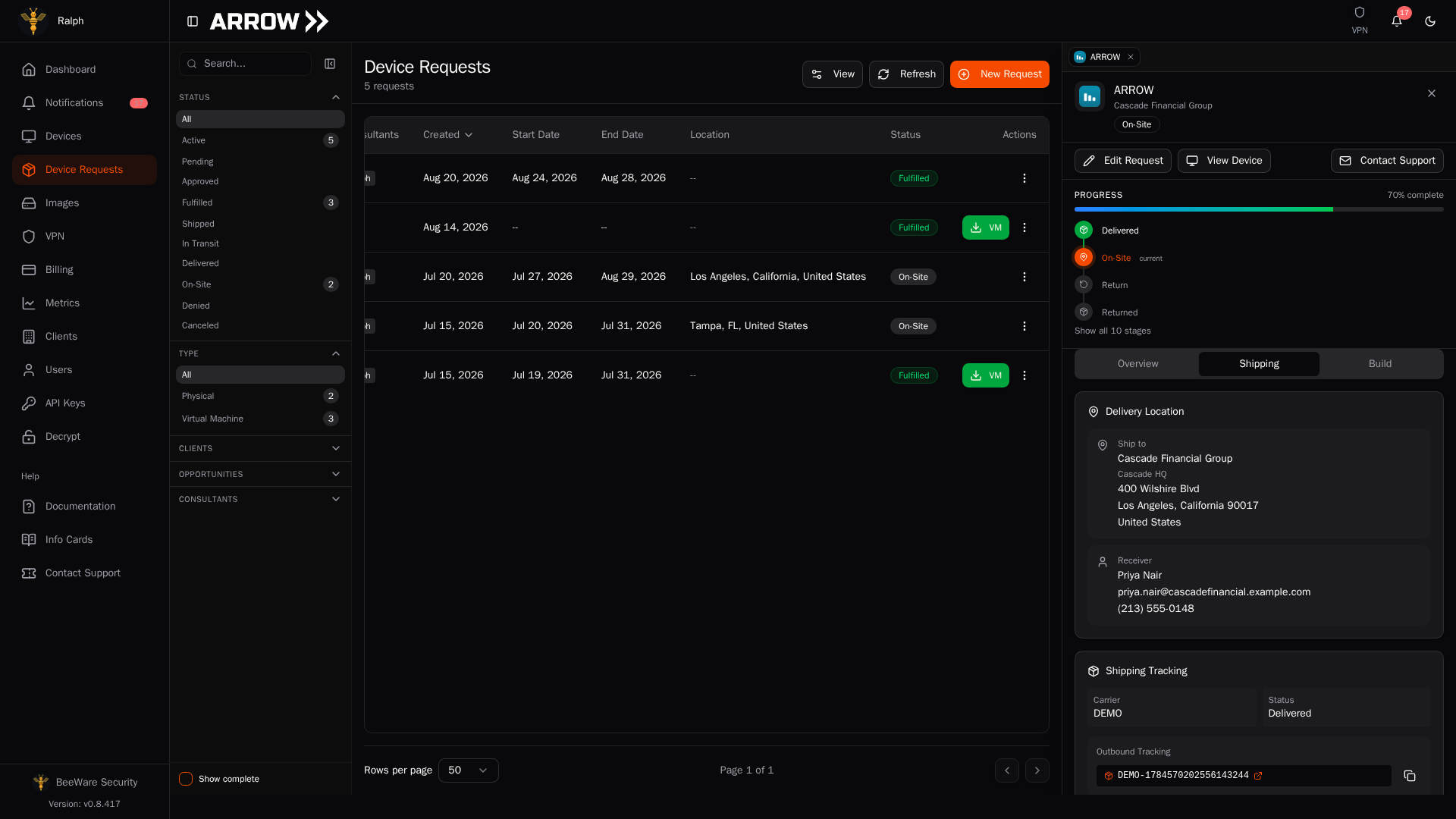
The Shipping tab of a device request. Each tracking number carries a copy button and, once a label has been issued for that leg, a printer button.
The Shipping tab of a device request. Each tracking number carries a copy button and, once a label has been issued for that leg, a printer button.
Two things are worth knowing. The button prints the label that was already bought for your return, so the tracking number does not change and the copy in the box stays valid if it turns up later. And because the label opens in a new window, a pop-up blocker will stop it silently, so allow pop-ups for the ARROW Platform if pressing the button appears to do nothing.
Carrier labels expire 90 days after they are created, and now and then a carrier refuses one. Either way you can replace it yourself, in either place. Under the return tracking number, beside Label expired or refused by the carrier?, click Request new label and confirm. ARROW buys a new prepaid return label and cancels the old one, so the return tracking number changes and the copy in the box stops working: print the new label with the printer button and put it on the box. The button is there once the device has been delivered, while the request is still open and before the carrier has scanned the current label, and you can use it once a day. For a day after a replacement the row tells you when the new label was created instead; if the carrier will not take that one either, contact VTEM Labs support. If there is no return tracking number or printer button at all, contact VTEM Labs support and we will issue a fresh label against the same request.
Returning from outside the US works the same way, with a few differences worth knowing. International shipments travel with UPS in both directions, so the prepaid label in the box is a UPS label. The customs paperwork for the return ships with it, already declared as returned goods, so hand the package over with those documents attached rather than filling in your own. If the carrier still asks for a printed commercial invoice, contact VTEM Labs support and we will send it to you: print all three copies, sign and date each one, and put them in a document pouch on the box with the existing return label. You do not need a new label. Duty and import VAT are billed to VTEM Labs rather than to you or your client. In the few countries where the carrier cannot collect a return, the box ships without a return label and we arrange the return with you instead.
If the return label will not work for your situation at all, for example there is no drop-off point you can reach or the package will not go by the booked service, contact VTEM Labs support for an alternative arrangement, ship with the carrier of your choice, and send the tracking information to support.
Plan for 3 to 5 business days for the return to reach the warehouse. Once you drop it off, the return tracking appears automatically in the ARROW Platform and updates as the package moves, and your device status changes to “Returned” when it arrives at the warehouse. You will get a confirmation at that point.
Where We Can Ship
Section titled “Where We Can Ship”ARROW is U.S.-origin technology with encryption and cellular hardware in it, so the destination country decides what we can send and how. Most of the world is open, a set of countries needs a license first, and a small set is closed outright. The same rules apply to a virtual appliance or cloud image, because a download is an export, so choosing a VM instead of hardware does not move a destination from one list to the other.
Before you set a delivery location for an engagement outside the US, check the destination in the Export and Deployment Policy. Annex A of that page is the country-by-country reference, and clause 7 covers the cases where we deploy a virtual appliance instead of shipping hardware, which is often the faster route anyway.
The ARROW Platform flags the destination for you as well. Enter a non-US country on a client location, or pick a delivery location outside the US on a request, and it names which list that country falls on and links back to the policy. Treat it as a prompt to read the policy rather than the answer, because the part that usually decides an engagement is who the recipient is, and that is not something an address field can tell us.
The US territories are domestic, not foreign. Puerto Rico, the US Virgin Islands, Guam, American Samoa, and the Northern Mariana Islands sit inside the US customs territory, so a device going to one of them ships as a domestic shipment, travels without customs paperwork, and raises no export notice when you enter the address.
Two things worth knowing up front. The location on the request is what we screen, so it has to be the address the device will actually sit at. And a device may not be carried or shipped on to another country without written approval from VTEM Labs, because moving it across a border is a new export in its own right.
Common Questions
Section titled “Common Questions”Can I change the shipping address after submitting? Yes, up until a shipping label has been purchased. Open the request in Device Requests, go to the Shipping tab, and click Update address on the Delivery Location card. See Managing Active Requests for what the dialog covers and what to do once the label exists.
Which carriers are used? Major carriers including FedEx, UPS, and DHL, depending on your location and shipping requirements. Anything going outside the US ships with UPS in both directions. Shipments to the US territories are domestic, so they are not limited to UPS.
Who pays customs duty and import VAT? VTEM Labs. International shipments are sent with duty and import taxes billed to us, so the carrier should not be asking you or your client to pay anything on delivery. If a carrier does invoice you, contact VTEM Labs support rather than paying it.
How long does shipping take? Domestic US shipments typically take 2 to 3 business days. International shipments run 5 to 10 business days depending on the destination.
What if I need it faster? Contact VTEM Labs support to discuss expedited options. Rush orders may incur additional charges.
I lost the return label. Do I need a new one? No. Open the request in Device Requests, go to the Shipping tab, and press the printer button beside the return tracking number to print the same label again. See Lost the label? Print another one.
Can I return from a different address? Yes. The included label is pre-addressed to the VTEM Labs warehouse and works from any carrier drop-off point, so it does not matter which address you ship it from.
Related Documentation
Section titled “Related Documentation”- Export and Deployment Policy - Where devices and images may be delivered
- Device Requests - Requesting devices and VMs
- Device Management - Managing your deployed devices
- ARROW Manager Overview - Device setup and configuration