
Microsoft Azure
Azure Deployment
Section titled “Azure Deployment”Running ARROW on Azure means uploading a disk image, registering it as a managed image, and launching VMs from it. Your Azure build downloads as a ZIP containing the disk image and arrow-deploy, a single tool that does all of it.
What is in the download
Section titled “What is in the download”| File | What it is |
|---|---|
*.vhd | The disk image. Fixed-size, usually 120 GB. |
arrow-deploy-linux-amd64 | The deploy tool for Linux |
arrow-deploy-darwin-arm64 | The deploy tool for macOS (Apple silicon) |
arrow-deploy-windows-amd64.exe | The deploy tool for Windows |
*-deployment.txt | A summary of this build and the manual commands |
DEPLOY-README.txt | Quick reference |
deploy-to-azure.sh, Deploy-To-Azure.ps1 | The previous scripts, still included during the transition |
Prerequisites
Section titled “Prerequisites”You need the Azure CLI and AzCopy, and you need to be signed in with az login.
AzCopy matters more than it looks. The disk is fixed-size but mostly empty, and AzCopy uploads only the pages that hold real data, so you transfer roughly 30 to 50 GB instead of the full 120 GB.
You also need a resource group and a storage account in the region you are deploying to.
Check everything before you start
Section titled “Check everything before you start”doctor verifies your prerequisites and creates nothing:
chmod +x arrow-deploy-linux-amd64./arrow-deploy-linux-amd64 doctor --cloud azure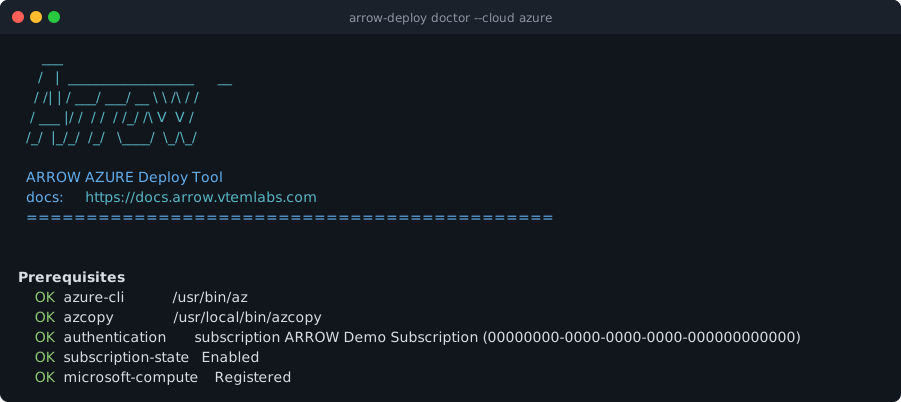
Anything reported as FAIL tells you what to fix. Resolve it before importing, so a long upload does not fail at the end for a reason you could have seen in a second.
Deploy
Section titled “Deploy”Step 1: Import the disk image
Section titled “Step 1: Import the disk image”This uploads the disk and registers it as a managed image. It is the slow step; the upload dominates.
./arrow-deploy-linux-amd64 import \ --cloud azure \ --image kali-arrow-yourclient-azure.vhd \ --image-name arrow-kali \ --resource-group my-resource-group \ --storage-account mystorageaccountThe command prints the image ID it created. You need it for the next step.
Step 2: Launch a VM
Section titled “Step 2: Launch a VM”./arrow-deploy-linux-amd64 launch \ --cloud azure \ --image-id <id-from-import> \ --vm-name arrow-kali-01 \ --resource-group my-resource-group \ --size Standard_D4s_v3The VM’s public address is printed when it is ready.
Step 3: Sign in
Section titled “Step 3: Sign in”The VM has two separate accounts, and it matters which one you use.
| Account | Who owns it | Password |
|---|---|---|
azureuser | Azure creates and owns it | Set by you at launch, or your SSH key |
arrow | The ARROW image | Unique to this VM, shown in the ARROW Portal |
Use arrow with the password from the Portal for console access and manual configuration. The VM connects back to ARROW on its own as soon as it has network access, so most of the time you do not need to sign in at all.
The VM keeps its ARROW name
Section titled “The VM keeps its ARROW name”A deployed VM’s hostname is the name shown on its device record in the ARROW Portal, not the Azure resource name. This is deliberate, because the Portal name is the identity your team works with, so the image keeps it and ignores the name Azure would otherwise apply.
Name the Azure resource whatever suits your subscription. It does not change the hostname inside the VM.
Removing what you created
Section titled “Removing what you created”cleanup reports what it would remove and deletes nothing until you add --yes:
./arrow-deploy-linux-amd64 cleanup --cloud azure --resource-group my-resource-group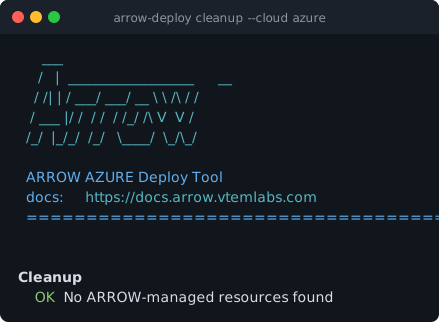
Once you are happy with the list:
./arrow-deploy-linux-amd64 cleanup --cloud azure --resource-group my-resource-group --yesIt only removes resources it created, which it identifies by its own marker. Narrow it further with --name-prefix when a group holds more than one deployment.
Command reference
Section titled “Command reference”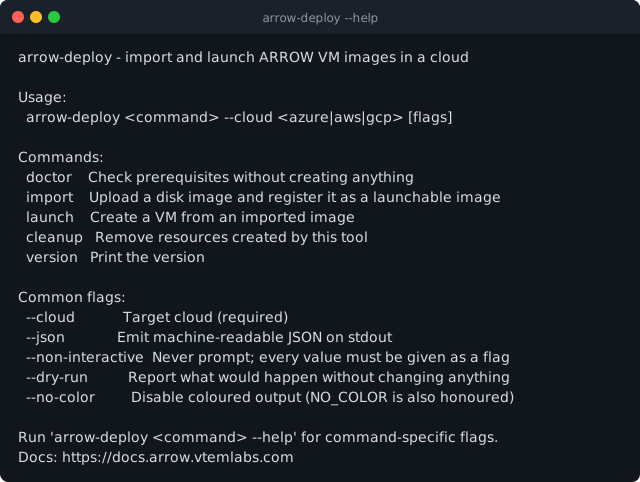
Commands
Section titled “Commands”| Command | What it does |
|---|---|
doctor | Checks prerequisites, creates nothing |
import | Uploads a disk image and registers it as a managed image |
launch | Creates a VM from an imported image |
cleanup | Removes resources the tool created |
version | Prints the version |
Flags used with Azure
Section titled “Flags used with Azure”| Flag | Applies to | Meaning |
|---|---|---|
--cloud azure | all | Target cloud, always required |
--image | import | Path to the .vhd |
--image-name | import | Name to register the image under |
--resource-group | import, launch, cleanup | Azure resource group |
--storage-account | import | Storage account for the upload |
--location | import, launch | Region |
--image-id | launch | The ID that import printed |
--vm-name | launch | Name for the VM |
--size | launch | VM size, for example Standard_D4s_v3 |
--network, --subnet | launch | Existing virtual network and subnet |
--security-group | launch | Network security group |
--ssh-key | launch | Name of an SSH key already in Azure |
--admin-username | launch | Cloud admin account, defaults to azureuser |
--name-prefix | cleanup | Restrict cleanup to matching names |
--yes | cleanup | Actually delete; without it cleanup only reports |
Flags available everywhere
Section titled “Flags available everywhere”| Flag | Meaning |
|---|---|
--dry-run | Report what would happen without changing anything |
--json | Machine-readable output, for scripting |
--non-interactive | Never prompt; every value must be supplied as a flag |
--no-color | Disable coloured output. NO_COLOR is also honoured |
Run arrow-deploy <command> --help for the full list.
Automating it
Section titled “Automating it”--json and --non-interactive together make the tool scriptable. Nothing prompts, and every result parses:
IMAGE_ID=$(./arrow-deploy-linux-amd64 import \  --cloud azure --json --non-interactive \  --image kali-arrow-yourclient-azure.vhd \  --image-name arrow-kali \  --resource-group my-resource-group \  --storage-account mystorageaccount | jq -r .image_id)
./arrow-deploy-linux-amd64 launch \  --cloud azure --json --non-interactive \  --image-id "$IMAGE_ID" \  --vm-name arrow-kali-01 \  --resource-group my-resource-group
Add --dry-run first to see exactly what a script will do before it does it.
Recommended VM sizes
Section titled “Recommended VM sizes”| Size | vCPU / RAM | Use |
|---|---|---|
Standard_D2s_v3 | 2 / 8 GB | Minimum |
Standard_D4s_v3 | 4 / 16 GB | Recommended for most work |
Standard_D8s_v3 | 8 / 32 GB | Heavier workloads |
Troubleshooting
Section titled “Troubleshooting”Extraction fails partway through. The disk inside the ZIP is 120 GB even though the ZIP is around 26 GB. Free up space for the full disk size and extract again.
doctor reports azcopy missing. Install it from the AzCopy downloads. Without it the upload falls back to transferring the entire fixed-size disk.
doctor reports authentication failed. Run az login, and confirm you are on the intended subscription with az account show.
The upload is very slow. Check that doctor reports azcopy as present. Uploading a 120 GB disk instead of its 30 to 50 GB of real data is the usual cause.
The arrow password from the Portal does not work. Confirm the cloud admin account was not named arrow. If it was, Azure has reset that account’s password and the VM needs redeploying with a different admin username.
The VM’s hostname is not the Azure resource name. That is expected. The VM keeps the name from its ARROW Portal device record.
Previous deploy scripts
Section titled “Previous deploy scripts”deploy-to-azure.sh and Deploy-To-Azure.ps1 are still included in the download and still work. They walk through the same flow interactively:
chmod +x deploy-to-azure.sh./deploy-to-azure.sh # import, then optionally launch./deploy-to-azure.sh --launch # launch from an image you already imported./deploy-to-azure.sh --cleanup # find and remove ARROW images and VMs.\Deploy-To-Azure.ps1.\Deploy-To-Azure.ps1 -Launch.\Deploy-To-Azure.ps1 -CleanupNew deployments should use arrow-deploy. It is the same flow on every platform, it supports --dry-run and --json, and it removes what it created if something fails partway.